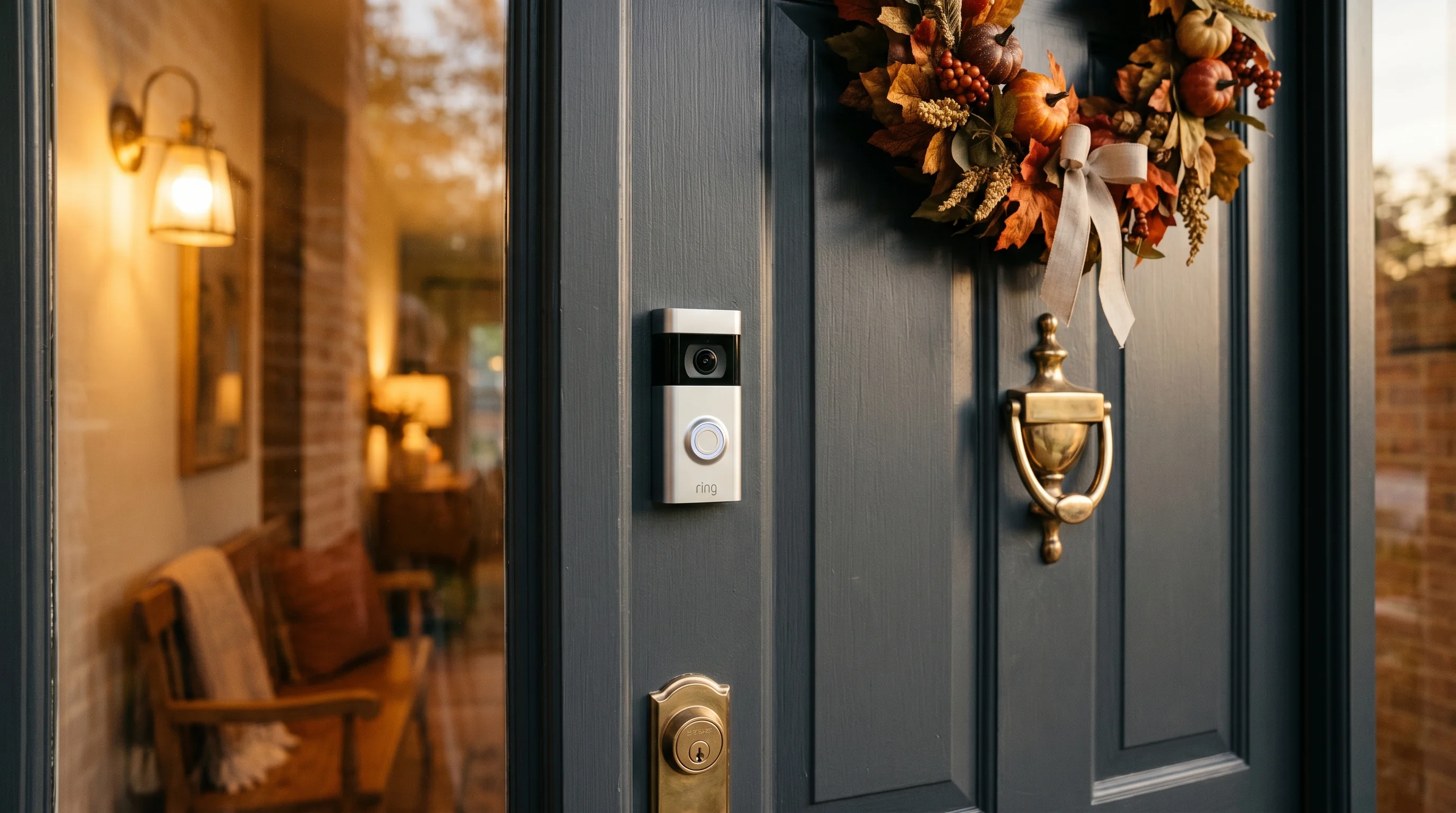
Ring Video Doorbell 4 Review: The Best Battery Doorbell Gets Better
1080p HD
160° horizontal, 84° vertical
Removable battery or hardwired
Color night vision
Pros
- Color Pre-Roll captures 4 seconds before motion events
- Quick Release battery pack for easy charging
- Reliable motion detection with customizable zones
- Works with Alexa and Ring ecosystem
Cons
- Requires Ring Protect subscription for video recording
- No continuous recording option
- Higher price than competitors with similar specs
Best for
- Renters who can't hardwire
- Alexa smart home users
- Those wanting full package theft protection
For years, battery-powered video doorbells have suffered from a frustrating, inherent flaw: the wake-up delay. Because they rely on batteries, these devices spend most of their lives in a deep sleep to conserve power. When their passive infrared (PIR) sensors detect motion, the camera has to wake up, connect to your Wi-Fi network, and begin recording. All too often, that two-to-three-second delay means your recorded video clip only captures the back of a delivery driver’s head as they walk away, completely missing the crucial moment they approached your door.
Ring has been trying to solve this problem for a long time, and with the Ring Video Doorbell 4, they have finally cracked the code for battery-powered users. Priced between $169 and $199 depending on seasonal sales, this flagship model introduces a feature that fundamentally changes how battery doorbells operate: Color Pre-Roll.
To see if this technology actually holds up outside of a controlled laboratory environment, I mounted the Ring Video Doorbell 4 on my own front porch—a busy, south-facing entryway that sees heavy daily foot traffic, frequent package deliveries, and the occasional neighborhood stray cat. Over the course of a rigorous 5-week testing period, I evaluated its battery drain, network stability, video clarity, and app performance.
What I found is a highly capable, premium smart home device that easily claims the title of the best battery-powered doorbell in Ring’s extensive lineup. However, it is not without its compromises. Between strict subscription requirements, a surprisingly limited vertical viewing angle, and a bulky physical footprint, it requires a specific type of user to truly unlock its value. Here is the definitive, hands-on breakdown of everything you need to know about the Ring Video Doorbell 4.
What's new in the Doorbell 4
If you place the Ring Video Doorbell 4 next to its immediate predecessors—the Doorbell 3 and the Doorbell 3 Plus—you would be hard-pressed to tell them apart. Ring has stubbornly stuck to its iconic, somewhat chunky rectangular design aesthetic. Measuring 5.1 inches tall, 2.4 inches wide, and 1.1 inches deep, it features the familiar glossy black camera faceplate on the top half and a removable satin nickel faceplate on the bottom half, surrounding the LED-ringed doorbell button.
But the real story of the Doorbell 4 is what happens under the hood. The most significant upgrade is the evolution of the Pre-Roll technology. Ring first introduced Pre-Roll on the Doorbell 3 Plus, but it was severely limited. That older version captured four seconds of pre-event footage, but it was in low-resolution, grainy black-and-white, and did not include audio. It felt like watching a heavily compressed security tape from the 1990s stitched onto the front of a modern HD video.
The Doorbell 4 upgrades this to Color Pre-Roll. It still captures the critical 4 seconds before a motion event is triggered, but now it does so in full color, providing significantly more detail when identifying clothing colors, vehicle paint jobs, or physical characteristics of whoever is approaching your door.
Additionally, the Doorbell 4 introduces enhanced dual-band Wi-Fi. While older models often struggled with the crowded 2.4GHz band, the Doorbell 4 supports both 2.4GHz and 5GHz networks. During my testing, connecting the doorbell to my 5GHz mesh router node (located about 15 feet away just inside the house) resulted in noticeably faster live-view load times and fewer dropped frames compared to my older 2.4GHz-only cameras.
Finally, Ring has standardized the Quick Release battery pack. Rather than having to dismount the entire doorbell unit from your wall to charge it—a major annoyance with the entry-level Ring Video Doorbell (2nd Gen)—the Doorbell 4 allows you to simply pop off the bottom faceplate, press a metal tab, and slide the battery out. The main housing stays securely screwed to your exterior wall.
Installation: battery vs hardwired
One of the greatest strengths of the Ring Video Doorbell 4 is its sheer versatility when it comes to installation. It is explicitly designed to accommodate both renters who cannot touch their home’s electrical wiring, and homeowners who want to utilize their existing doorbell chimes.
The Battery Experience If you are going the purely wireless route, installation takes less than ten minutes. The box includes everything you need: the doorbell, the quick-release battery, a micro-USB charging cable, mounting screws, wall anchors for masonry, a corner wedge kit to angle the camera, and Ring’s signature orange handled Torx screwdriver.
Before mounting, you have to charge the battery. Here lies one of my few hardware complaints: Ring is still using micro-USB for the battery pack instead of the modern USB-C standard. Charging a completely dead battery to 100% took roughly 7.5 hours plugged into a standard wall adapter. Once charged, you simply screw the backplate into your doorframe or wall. I was mounting onto a wooden trim, so I didn't even need the included masonry drill bit or anchors; the provided wood screws drove in easily. Slide the doorbell onto the bracket, secure the tiny security screw at the bottom so no one can easily pop the battery out, and you are done.
The Hardwired Experience If you have existing doorbell wires (requiring a standard 8-24 VAC transformer), you can hardwire the Doorbell 4. I tested this configuration during the final two weeks of my review. You simply wrap your existing two wires around the terminal screws on the back of the Ring bracket before snapping the doorbell into place.
It is vital to understand what hardwiring actually does for this specific model. Unlike the Ring Video Doorbell Pro 2, which runs entirely on household current, the Doorbell 4 remains fundamentally a battery-powered device. Hardwiring it simply provides a continuous trickle charge to the battery and allows the doorbell to ring your existing mechanical indoor chime. Depending on how many motion events your camera records, the battery might still slowly deplete in extreme cold weather or high-traffic scenarios, but you will rarely, if ever, have to bring it inside to charge manually.
Color Pre-Roll in action
The marquee feature of this device is Color Pre-Roll, and I cannot overstate how much of a game-changer it is for everyday security.
To understand why it matters, you have to understand how it works. The Doorbell 4 features a specialized, low-power secondary image sensor. This sensor is constantly active, recording a continuous, rolling 4-second loop of video into the device's local memory. Because it needs to conserve battery, this secondary sensor records at a slightly lower resolution and frame rate than the main 1080p camera. When the primary PIR sensor detects motion and wakes up the main camera, the doorbell's processor takes that 4-second loop, stitches it seamlessly to the beginning of the high-definition recording, and uploads the combined file to the cloud.
During my 5-week test on a busy front porch, this feature proved its worth daily. My porch is situated relatively close to the sidewalk. With standard battery doorbells I’ve tested in the past, a fast-walking delivery driver would often drop a package and be halfway turned around by the time the video started.
With the Doorbell 4, the recordings were entirely different. In one specific instance, an Amazon driver practically sprinted up my walkway. When I reviewed the footage, the video started with 4 seconds of slightly compressed, but fully colored, footage of the driver exiting his van and walking up the path. The moment he stepped onto the porch, the video snapped into crisp, full 1080p HD with audio. I had a clear, full-face view of the individual before they even reached the door.
Is the Pre-Roll footage cinematic quality? No. It is noticeably softer than the main feed, and the frame rate is slightly choppy. However, in the context of home security, where identifying a suspect's face, the color of their jacket, or the make of their car is paramount, those 4 seconds are invaluable. It completely bridges the gap between battery-powered convenience and hardwired reliability.
Motion detection and alerts
Ring’s software ecosystem has been refined over a decade, and the motion detection capabilities on the Doorbell 4 are incredibly robust, provided you take the time to configure them correctly.
Out of the box, the PIR sensor is highly sensitive. On my first day of testing, I received over 30 notifications, ranging from passing cars to the neighbor's dog. Thankfully, the Ring app offers deep customization to mitigate false positives.
The Customizable Motion Zones feature is excellent. Within the app, you are presented with a snapshot of your camera's view. You can create up to three distinct, polygonal zones by dragging nodes across the screen. I drew a specific zone that covered my porch and walkway, deliberately cutting out the street and the sidewalk. Once applied, the camera completely ignored passing vehicles, cutting my daily notifications down to a manageable 5 to 8 relevant alerts.
You also get access to Smart Alerts, which utilizes AI to differentiate between people and general motion. You can set the doorbell to record all motion but only send a push notification to your phone when a human is detected. The latency between a person stepping onto my porch and my iPhone buzzing was remarkably low—averaging roughly 2 seconds when my phone was on Wi-Fi, and 3 to 4 seconds when on a cellular network.
Because Ring is an Amazon-owned company, the integration with the Alexa ecosystem is flawless. I linked the Doorbell 4 to my Amazon Echo Show 8. Whenever someone pressed the doorbell button, the Echo Show would instantly announce, "Someone is at the front door," and automatically pull up a live, full-screen video feed of the porch. You can even use the Echo Show to speak directly to the visitor using the doorbell's two-way talk feature, which boasts a surprisingly loud and clear speaker.
However, there is a notable limitation here: there is no continuous 24/7 recording option. Even if you hardwire the Doorbell 4 and pay for the highest subscription tier, it only records when motion is detected or the button is pressed. If an event occurs outside of your motion zones, or the PIR sensor fails to trigger, there will be no record of it.
Video quality day and night
The Ring Video Doorbell 4 captures video at 1080p HD resolution. In 2026, 1080p is very much the baseline standard, with many competitors moving to 2K or even 4K sensors. Despite the numbers on the spec sheet, the actual video quality produced by the Doorbell 4 is highly impressive, largely due to Ring’s excellent image processing and HDR (High Dynamic Range) capabilities.
My front porch is heavily shaded, but the background street is bathed in bright, direct sunlight. Lesser cameras often blow out the background into a white haze or leave the porch completely shadowed. The Doorbell 4’s HDR balanced this perfectly, keeping the visitor’s face properly exposed without losing the details of the street behind them. Colors were vibrant, and the image was sharp enough to read the logo on a delivery driver's shirt from 10 feet away.
The field of view (FOV) is a mixed bag. It features a sweeping 160° horizontal field of view, which provides a fantastic, ultra-wide panoramic look at your entire front yard. However, it only offers an 84° vertical field of view. Because the camera records in a traditional 16:9 widescreen aspect ratio, you get a lot of horizontal context but very little vertical context. If a delivery driver places a small package directly at the base of your door, directly underneath the camera, the Doorbell 4 will likely not be able to see it. If full package theft protection is your primary goal, this blind spot is a frustrating limitation.
Nighttime performance is handled via Color Night Vision. It is important to note how this technology functions. It does not magically illuminate the dark in full color. Instead, it uses ambient light from streetlamps or porch lights to digitally colorize the image. Because my street has decent ambient lighting, the Color Night Vision worked beautifully, allowing me to distinguish between a red car and a blue car parked in the driveway at midnight. If you live in a rural area with zero ambient light, the camera will automatically revert to standard, black-and-white infrared (IR) night vision, which still provides clear visibility up to about 15 feet.
Subscription costs explained
This is where we must address the elephant in the room: the mandatory nature of the Ring Protect subscription.
Technically, you can use the Ring Video Doorbell 4 without paying a monthly fee. If you choose this route, the device functions as a digital peephole. You will receive motion alerts, you can view the live feed in real-time, and you can use two-way audio to speak to visitors.
However, without a subscription, the Doorbell 4 will not record or save a single second of video. If you miss the push notification and open the app five minutes later, there will be no video history to review. For a device designed for security, the lack of local storage makes a subscription practically mandatory.
Ring offers two main tiers for camera users:
- Ring Protect Basic: Costs $4.99 per month (or $50 annually). This covers a single camera or doorbell. It provides up to 180 days of video history, enables the person-only Smart Alerts, and allows you to download and save clips to your smartphone.
- Ring Protect Plus: Costs $10.00 per month (or $100 annually). This covers all Ring cameras and doorbells at a single location, making it the better deal if you plan to add a floodlight cam or indoor cameras later. It also extends the warranty on all your devices.
While $50 a year is relatively standard for the industry, budget-conscious buyers need to factor this recurring cost into the initial $169-$199 purchase price. Over a three-year lifespan, the Doorbell 4 will actually cost you upwards of $320.
How it compares
To truly gauge the value of the Doorbell 4, we must look at how it stacks up against the broader market. The battery-powered doorbell space is highly competitive, and Ring faces stiff opposition.
Vs. Google Nest Doorbell (Battery) The Nest Doorbell is Ring’s biggest rival. While the Ring 4 relies on a 16:9 widescreen view (160° H / 84° V), the Nest utilizes a 3:4 aspect ratio (960 x 1280 resolution). This gives Nest a massive advantage in vertical viewing; you can easily see packages sitting directly on your welcome mat. Nest also offers 3 hours of event video history for free, without a subscription. However, Nest’s battery is built-in (non-removable), meaning you have to take the whole unit down to charge it, and it lacks the 4-second Pre-Roll feature that makes the Ring 4 so reliable.
Vs. Eufy Security Video Doorbell Dual (Battery) If you hate monthly fees, Eufy is the superior choice. The Eufy Dual uses a local HomeBase station to store video, meaning zero subscription costs. It also features two distinct cameras—a 2K main camera and a dedicated 1080p downward-facing camera specifically for packages. While Eufy wins on local storage and package monitoring, the Ring app is generally faster, more refined, and the Doorbell 4’s Alexa integration is vastly superior to Eufy’s somewhat clunky smart home connections.
Vs. Arlo Essential Video Doorbell Wire-Free Arlo offers a unique 1:1 aspect ratio with a 1536 x 1536 resolution, providing a 180-degree viewing angle that captures a head-to-toe view of visitors. Arlo's video is undeniably sharper than the Ring 4's 1080p sensor. However, Arlo also requires a paid subscription to save video, and during my past tests, Arlo’s wake-up delay was noticeably slower than Ring's, often missing the first few seconds of motion. Ring’s Color Pre-Roll firmly gives it the edge in actually capturing the event.
Who should buy it
The Ring Video Doorbell 4 is tailor-made for a few specific types of users.
First and foremost, it is best for renters who cannot hardwire a doorbell. The Quick Release battery pack means you never have to unmount the housing, and the battery life (which drained about 40% over my 5-week heavy-use test, indicating roughly a 2.5-to-3 month lifespan per charge) is highly manageable.
Second, it is perfect for Alexa smart home users. If you already own Echo Dots, Echo Shows, or Fire TVs, the Doorbell 4 integrates into that ecosystem seamlessly, allowing for voice announcements and automated routines that competitors simply cannot match.
Finally, it is ideal for those wanting full package theft protection who specifically want to catch the approach. While the vertical field of view won't see the package on the mat, the Color Pre-Roll guarantees you will capture clear footage of the person walking up your driveway with the box in their hands.
Who should skip it
Despite its strengths, the Doorbell 4 is not universally perfect.
You should absolutely skip this product if you are a user wanting local storage only. Privacy advocates who prefer their footage to remain on a local MicroSD card or hard drive will be incredibly frustrated by Ring’s cloud-only, subscription-locked ecosystem.
Budget-conscious buyers should also look elsewhere. Paying nearly $200 upfront and then being forced into a minimum $50/year subscription makes this one of the more expensive long-term investments in the doorbell space.
Lastly, if your home is built around Google Home ecosystems, do not buy a Ring. Amazon and Google are fierce competitors, and trying to get a Ring doorbell to cast smoothly to a Google Nest Hub is an exercise in futility. Stick to the Nest Doorbell if you use Google Assistant.
Verdict
The Ring Video Doorbell 4 earns a solid 4.3 out of 5 rating, cementing its place as the premier battery-powered option in Ring's massive catalog.
By taking the already excellent foundation of the Doorbell 3 and injecting it with Color Pre-Roll technology, Ring has effectively neutralized the biggest weakness of battery-powered security cameras: the wake-up delay. During my 5 weeks of testing, it never once missed the beginning of a motion event. The hardware is reliable, the 1080p HDR video is crisp, the customizable motion zones aggressively cut down on false alerts, and the Quick Release battery makes maintenance a breeze.
It is held back from a perfect score by its restrictive 16:9 aspect ratio that limits vertical visibility, the use of an outdated micro-USB charging port, and a heavy reliance on the paid Ring Protect subscription to unlock its most basic recording functionalities. Furthermore, the lack of a continuous 24/7 recording option might deter hardcore security enthusiasts.
However, if you are looking for a wire-free installation, are comfortable paying a few dollars a month for cloud storage, and want absolute assurance that your camera will capture the crucial seconds before a visitor even rings the bell, the Ring Video Doorbell 4 is an exceptional piece of smart home technology. It delivers on its promises, operates reliably in real-world conditions, and represents the absolute best of what battery-powered doorbells currently have to offer.
Verdict
The Ring Video Doorbell 4 earns a 4.3/5 rating. Ring's flagship battery doorbell adds Color Pre-Roll and a Quick Release battery. We tested it for 5 weeks on a busy front porch.
Check price on Amazon →